Creating a Motorbike Listings Page
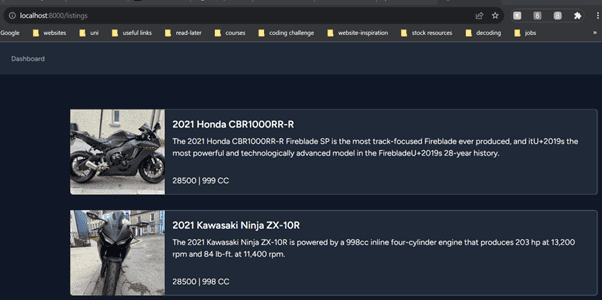
Motorbike listing page
The creation of a motorbike listings page was both an exciting and educating journey.
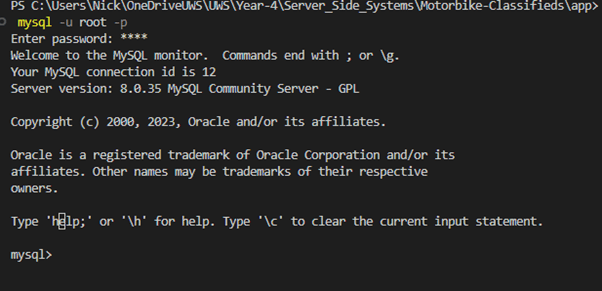
As I was working locally, I had to install MySQL, after installing MySQL I initially had connection issues, as I must have installed MySQL previously and had forgotten my root password. After a long Google search and frustration with technical blogs full of jargon that didn’t help, I finally came across a YouTube video that explained the process of resetting your root password and had a step-by-step process. Reset-your-MySQL-password. However, I was still having issues with logging into MySQL via my project’s terminal.
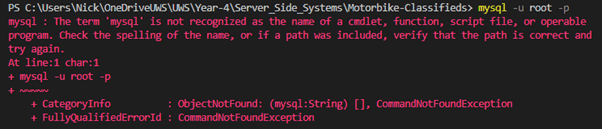
However, this was solved by updating the Path in Window’s environment variables
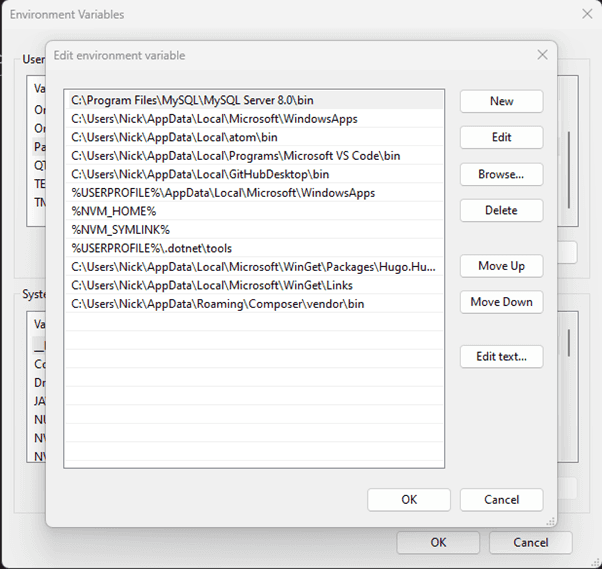
Fixed! :D
Laravel makes it easy to control and manage database schema, providing a convenient way to modify database tables. Using the following command:
php artisan make:migration create_motorbikes_table
This created a file in the database/migrations directory.
I added the following code in file it created: inside the public function up() function:
Schema::create('motorbikes', function (Blueprint $table) {
            $table->id();
            $table->timestamps();
            $table->timestamp('published_at')->nullable();
            $table->foreignId('user_id');
            $table->foreignId('category_id');
            $table->string('title');
            $table->string('thumbnail_url');
            $table->text('description');
            $table->text('summary', 500);
            $table->string('slug');
            $table->string('make');
            $table->string('model');
            $table->string('engine');
            $table->string('year');
            $table->integer('price');

        });
Code Block 1: Motorbike Model Schema
Next, I created the Motorbike model using php artisan make:model Motorbike
When the php artisan migrate is executed Laravel will create the motorbikes table in the configured database, and then using the Motorbike model allowing me to interact with this this table.
I went through the same process to create a categories table: php artisan make:migration create_categories_table and php artisan make:model Category
Schema::create('categories', function (Blueprint $table) {
            $table->id();
            $table->timestamps();
            $table->string('category');
        });
Code Block 2: Categories Schema
Executing the following command applies these changes to the database, executing the up() method:
php artisan migrate
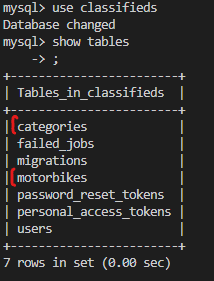
When making changes to these files you can use the fresh command php artisan migrate:fresh
This executes the down() method for the last batch of migrations. Deleting the tables and then recreating them, also deleting all the data. For development I solved this problem by including some dummy data in the DatabaseSeeder.php file in the /database/seeders directory.
\App\Models\Category::create([
            'category' => 'Sport'
        ]);

        \App\Models\Motorbike::create([
            'title' => '2021 Honda CBR1000RR-R',
            'thumbnail_url' => 'https://www.motorcycle.com/blog/wp-content/uploads/2020/02/021020-2021-Honda-CBR1000RR-R-Fireblade-SP-1.jpg',
            'description' => 'The 2021 Honda CBR1000RR-R Fireblade SP is the most track-focused Fireblade ever produced, and itU+2019s the most powerful and technologically advanced model in the FirebladeU+2019s 28-year history. The CBR1000RR-R Fireblade SP is powered by a new 999cc inline four-cylinder engine that produces 214 hp at 14,500 rpm and 83 lb-ft. at 12,500 rpm. The engine is mated to a six-speed cassette-type gearbox.',
            'summary' => 'The 2021 Honda CBR1000RR-R Fireblade SP is the most track-focused Fireblade ever produced, and itU+2019s the most powerful and technologically advanced model in the FirebladeU+2019s 28-year history.',
            'slug' => '2021-honda-cbr1000rr-r',
            'make' => 'Honda',
            'model' => 'CBR1000RR-R',
            'engine' => '999',
            'year' => '2021',
            'price' => '28500',
            'user_id' => 11,
            'category_id' => 1
        ]);

        \App\Models\Motorbike::create([
            'title' => '2021 Kawasaki Ninja ZX-10R',
            'thumbnail_url' => 'https://www.motorcycle.com/blog/wp-content/uploads/2020/11/111020-2021-Kawasaki-Ninja-ZX-10R-1.jpg',
            'description' => 'The 2021 Kawasaki Ninja ZX-10R is powered by a 998cc inline four-cylinder engine that produces 203 hp at 13,200 rpm and 84 lb-ft. at 11,400 rpm. The engine is mated to a six-speed cassette-type gearbox. The ZX-10R is equipped with a Showa Balance Free Fork and Balance Free Rear Cushion shock, both of which are fully adjustable. The ZX-10R is equipped with a Bosch six-axis IMU that controls the Kawasaki Cornering Management Function, Kawasaki Launch Control Mode, Kawasaki Traction Control, Kawasaki Intelligent anti-lock Brake System, Kawasaki Engine Brake Control, and Kawasaki Quick Shifter.',
            'summary' => 'The 2021 Kawasaki Ninja ZX-10R is powered by a 998cc inline four-cylinder engine that produces 203 hp at 13,200 rpm and 84 lb-ft. at 11,400 rpm.',
            'slug' => '2021-kawasaki-ninja-zx-10r',
            'make' => 'Kawasaki',
            'model' => 'Ninja ZX-10R',
            'engine' => '998',
            'year' => '2021',
            'price' => '28500',
            'user_id' => 11,
            'category_id' => 1
        ]);
Code Block 3: Database seeder
So now I can execute the following command php artisan migrate:fresh –seed, which will drop all tables, recreate them and fill them with my data from the seeders file.
I also created relationships, between the tables, using Laravel’s Eloquent relationships.
Each instance of a Motorbike will belong to a single User and belong to a single Category. So, in the Motorbike.php in the /Models directory, I added the following methods:
public function user()
    {
        return $this->belongsTo(User::class);
    }

    public function category()
    {
        return $this->belongsTo(Category::class);
    }
Code Block 4: Eloquent Relationships
Finally, it was time to make the listing page.
In the main routes file /routes/web.php I added the following code:
Route::get('/listings', function () {
    return view('pages/listings', [
        'motorbikes' => Motorbike::all()
    ]);
});

Route::get('/motorbikes/{motorbike}', function (Motorbike $motorbike) {
    return view('pages/motorbike', [
        'motorbike' => $motorbike
    ]);
});
Code Block 5: Listing Routes
The first line imports the Motorbike model, so the code knows where to find the model.
When a user inputs the /listings endpoint in the URL the code will fetch all the motorbikes and return them to the listings.blade.php file in the /resources/views/pages directory.
This file now has access to a variable called motorbikes that contains all the motorbikes received.
<x-app-layout>
    @foreach ($motorbikes as $motorbike)
    <a href="/motorbikes/{{$motorbike->id}}">
        <div class=" w-full lg:max-w-full lg:flex shadow-sm p-4">
        <div
            class="h-48 lg:h-auto lg:w-48 flex-none bg-cover rounded-t-md lg:rounded-t-none lg:rounded-l-md text-center overflow-hidden bg-center"
            style="background-image: url('{{$motorbike->thumbnail_url}}')" title="Mountain">
        </div>
        <div class="border-r border-b border-l border-gray-400 lg:border-l-0 lg:border-t lg:border-gray-400 bg-white dark:bg-gray-800 rounded-b-md lg:rounded-b-none lg:rounded-r-md p-4 flex flex-col justify-between leading-normal">
            <div class="mb-8">
            <div class="text-gray-900 dark:text-white font-bold text-xl mb-2">{{$motorbike->title}}</div>
            <p class="text-gray-700 dark:text-white text-base">{{$motorbike->summary}}</p>
            </div>
            <div class="flex-row items-center dark:text-white">
                <p>{{$motorbike->price}} | {{$motorbike->engine}} CC</p>
            </div>
        </div>
        </div>
    </a>
    @endforeach
</x-app-layout>
Code Block 6: Blade motorbike listings
Conclusion
The creation of the motorbike listings page has been a technical challenge and a valuable learning experience.
The initial hurdles with MySQL installation and password recovery provided an opportunity to learn how to reset the Root password.
Using Laravel’s migration commands made the process of schema creation easy, enabling efficient modification of database tables. The use of dummy data through seeders development, allowing for realistic testing scenarios. Establishing relationships between tables using Laravel’s Eloquent relationships enhanced the database structure, promoting better organisation and retrieval of data.
The implementation of the motorbike listings page involved creating routes in Laravel, retrieving data from the Motorbike model and rendering it dynamically in the Blade views.